Fix common problems
Use this page when streaming feels slow, search hangs, or you can’t sign in. Work top to bottom — most people fix it in the first two sections.
Buffering or slow playback
Section titled “Buffering or slow playback”- Lower the quality — while a video is playing, open the gear icon and pick a lower resolution.
- Turn off extra sources — the globe icon next to Search can slow things down on a weak connection. See the next section.
- Move closer to Wi‑Fi or use a wired connection if you can.
- On a phone or TV app, try pausing for a few seconds, then play again.
Still buffering after that? See device-specific tips in Watch on any device.
Extra sources (globe icon)
Section titled “Extra sources (globe icon)”The globe next to Search turns extra playback sources on or off. When it’s on, the player may look for more places to play a title. That helps sometimes, but it uses more data and can make search and playback feel slow.
If pages load slowly, searches hang, or video buffers more than usual — turn it off:
- Open jfapp.xyz and sign in.
- Go to the Search bar.
- Tap the globe to the left of Search until you see a globe with a slash.
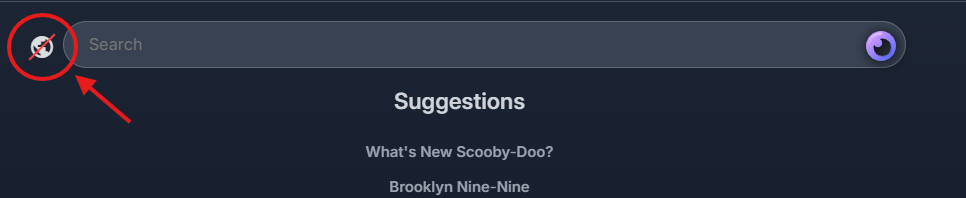
Your regular library still works with extra sources off. Full walkthrough: Extra sources (globe icon).
Can’t connect or sign in
Section titled “Can’t connect or sign in”“Unable to connect to server” / server not found
Section titled ““Unable to connect to server” / server not found”- Enter exactly
jfapp.xyz(nohttps://in most mobile/TV apps; desktop may usehttps://jfapp.xyz). - Turn off VPN temporarily and try again.
- Check status.jfapp.xyz.
- Remove the saved server in the app and add
jfapp.xyzagain.
“Invalid username or password”
Section titled ““Invalid username or password””- Check caps lock and spelling.
- Make sure you finished your invite link setup first.
- Wait a minute after setup, then try again.
- Ask the admin for a password reset if you’re locked out.
Works in the browser but not in the app
Section titled “Works in the browser but not in the app”- Update the app from the store or the Downloads page.
- Delete the server entry and add
jfapp.xyzagain. - Confirm the same username and password work at jfapp.xyz.
Picture or sound problems
Section titled “Picture or sound problems”| What you see | What to try |
|---|---|
| Video but no sound | Turn Direct play off in the app settings, or lower quality |
| Green or purple colors (desktop) | Client Settings → Video → set Hardware decoding to Disabled |
| Audio out of sync | Turn hardware decoding off; update the app and graphics drivers |
| 4K stutters on TV | Drop quality to 1080p |
More detail by device: Watch on any device.
Still stuck?
Section titled “Still stuck?”- Set up your account — invite and first sign-in
- Ask for a movie or show — if a title is missing from the library
- Downloads — reinstall or switch clients
- YouTube buffering instead? See Fix YouTube playback issues